Fill SVG with Other Shapes

SVG designers often want more than simple fill colors.
They want to fill an SVG with other shapes to create:
- custom shaped patterns;
- textured typography effects;
- and eye-catching vector artwork.
However, doing this is manually is complex and time consuming.
It often requires desktop software, Illustrator plugins or a lot of manual work.
That is exactly why svg.design has an online solution.
With the Fill SVG Tool, your goal is simple.
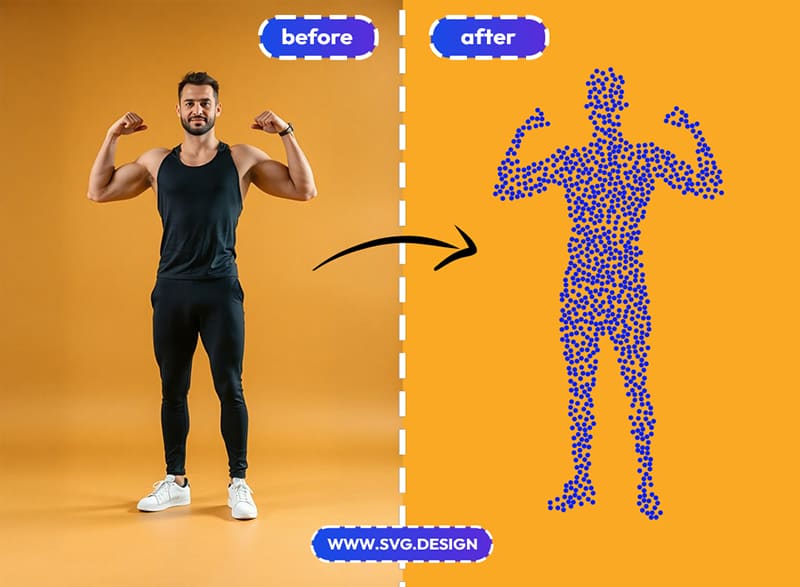
You can upload any SVG and fill it with other vector shapes.
Filling SVGs Manually is Too Hard ❌
Most vector tools only let you fill shapes with flat colors, gradients, or image masks.
That works for basic designs, but it limits creativity when you want to build patterns from real flat vector shapes.
There are plugin ideas, like the famous Fillinger concept for Illustrator, that solve this.
But they live inside heavy desktop software.
You must install apps, manage versions, and learn complex workflows.

Fo for many designers, creators, and marketers, the process becomes slow and frustrating.
Especially when all they want is to quickly fill one SVG shape with other shapes and move on with their project.
That gap is the real problem.
Try the Automatic Shape Filler 👇🏼
The Fill SVG tool at svg.design brings this workflow to the browser.
It is inspired by the Fillinger plugin idea, but rebuilt as a simple, fast, and fully online experience.
Instead of opening desktop software, you just open the tool and upload your files.
And you can start creating instantly.
This makes advanced SVG pattern fills accessible to anyone, anywhere.
How the Tool Works:
The workflow is designed to be simple, even if you are not a vector expert.
First, you upload your main SVG shape.
This can be text converted to outlines, a logo, an icon, or any custom vector path.
Next, you upload one or more "filler" shapes.
These will be used as the elements that fill your main shape by forming a pattern.

After that, the tool automatically fills your main SVG with those shapes.
You immediately see the result in your browser.
You can customize the pattern by adjusting size, spacing and rotation.
So you control how tight, playful, or minimal the fill looks.
Finally, you can export the result as a clean SVG file.
Ready for web, print, or further editing in any vector editor.
Why Shape Fills Work 👌
When you fill an SVG with other shapes, you move beyond decoration.
You start adding meaning and character to your designs.
- For example, text filled with leaves can suggest nature and sustainability.
- A logo filled with icons can express what a brand stands for.
- A shape filled with dots or lines can create depth and texture without losing scalability.

Because everything stays in vector format, your designs remain sharp at any size.
That makes this approach perfect for modern digital and print workflows.
Practical Use Cases for Creative Patterns ✅
This technique fits naturally into many creative projects.
🎨 Logo and brand identity
Fill logos with custom symbols or brand elements to create unique identities that still stay fully editable in SVG format.
🖼️ Posters and illustrations
Create bold typography and shapes filled with patterns made from your own vectors, giving posters a handcrafted feel.
📊 Infographics and presentations
Use icons and shapes to fill titles or key visuals, making chart data or business storytelling more engaging and visually rich.
👕 Merchandise and print design
Design T-shirts, stickers, and packaging with detailed vector patterns that print cleanly at any size.
🌐 Web and UI graphics
Keep everything lightweight and responsive by using SVG patterns instead of heavy images in your interfaces and landing pages.
Skip the Complex Illustrator Plugins and Try a Simple Online Tool:
In the past, filling shapes with shapes meant relying on plugins and complicated setups.
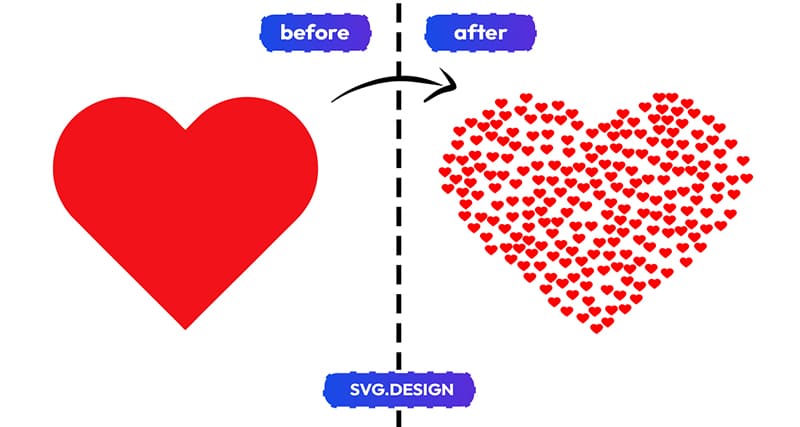
Today, this effect cab be done in seconds online.
The Fill Tool takes the core idea behind tools like Fillinger and makes it accessible online.
So you focus on your idea and the tool handles the heavy lifting.
May Your Shapes Be Filled ⚫️
If your goal is to fill SVG shape with other shapes and create custom vector patterns without complicated tools...
then svg.design is built for you.
With the SVG Fill Tool you can turn simple SVG files into creative patterns.
Upload your shapes, the fill objects and create your pattern instantly.

About the Author
I'm a vector artist and 3D designer and the founder of SVG.design. I love creating beautiful visuals and sharing what I've learned about design, productivity, and creativity with fellow artists and makers.