How to Recover SVG Editor Drafts and Use Autosave
Resume a local design by its preview, start fresh safely, and understand where browser drafts are stored.
In this guide 7 sections
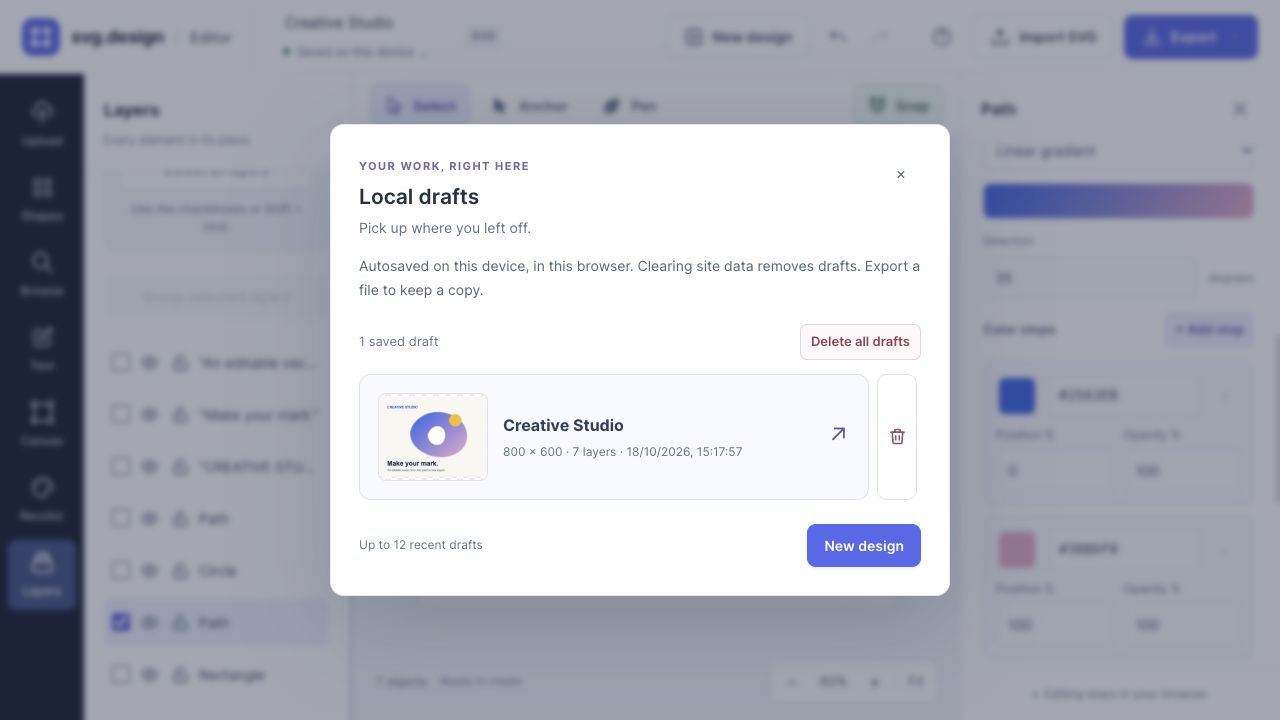
The SVG editor saves edits automatically as local drafts in the current browser. After a refresh or a later visit, the recovery message lets you keep editing the previous design, start fresh, or choose another draft by its artwork preview.
Drafts are a convenience for continuing work on the same device. Download an SVG for a copy you control: local drafts do not sync to an account or replace an exported backup.
Check that your work has saved
- Open the editor and import an SVG, add a shape, or choose a design starter.
- Give the design a recognizable name in the top bar.
- After editing, check the save-status button beneath the document name. Saved on this device means the current design has been saved locally.
- Before leaving important work, finish any Pen drawing and export an SVG copy.
Autosave runs as you edit and makes an additional checkpoint during normal tab closing or page hiding. A browser crash, storage error, or forced shutdown can still interrupt recent changes, so check the status and keep exports for important milestones.
Recover a design after refreshing
When the editor finds previous work, it can restore that design and show Pick up where you left off? with its name and saved time.
- Keep editing continues the recovered design.
- Start fresh opens a blank design while keeping the old one in Local drafts when storage is available.
- Other drafts opens the draft picker so you can choose a different design.
You do not need to delete an old draft to begin a new project. The prominent New design button provides the same fresh-start workflow during editing.
Find a draft by its preview
- Click the save-status button under the design name to open Local drafts.
- Look through the artwork thumbnails, design names, and saved times.
- Choose the draft you want to resume.
The welcome screen also shows recent drafts when there is no active artwork. Up to 12 recent drafts are retained; the list is a set of recent designs, not an unlimited history of every edit.
A thumbnail helps identify a composition, but it is not a separate backup file. Export the actual design to keep it outside the browser.
Delete one draft or clear the list
Open Local drafts and use the delete control on an individual draft to remove that design. Use the delete-all action to clear the draft list. Both actions ask for confirmation.
Export anything you want to keep before confirming. There is no draft trash or restore button after deletion. Deleting a local draft does not delete an SVG that you already downloaded to your computer.
Understand where drafts live
| Situation | What to expect |
|---|---|
| Refresh or revisit in the same browser profile | Recovery is available if the local data remains |
| Open a different browser, profile, or device | The original local drafts do not appear there |
| Move between localhost, a preview domain, and svg.design | Each origin has separate browser storage |
| Clear site data or remove the browser profile | Local drafts can be removed |
| Use private browsing or block site storage | Storage may be temporary or unavailable |
| Sign in on another device | Signing in does not sync these local drafts |
What to do if autosave fails
If the editor shows Couldn’t save · Export a copy, keep the tab open and export the design first. Browser storage may be full, blocked, or temporarily unavailable. After securing the file, review the browser’s storage settings or delete unwanted drafts to free space.
If a draft is missing, check that you are on the same domain and browser profile where you created it. The editor cannot recover browser data that has already been cleared. A previously exported SVG can be imported to begin again.
Questions about autosave
Is a draft the same as an SVG export?
No. A draft stores the editor document locally so you can resume it. Export creates a downloadable SVG, PNG, or JPG. Choose SVG when you want an editable vector copy.
Can I browse every earlier revision?
Local drafts store recent designs, not a version-by-version timeline. Use Undo during an editing session and export named milestones when you need separate versions.
Can someone else see my drafts on a shared computer?
Someone using the same browser profile and site can access its local drafts. Export and remove sensitive drafts when you finish using a shared profile.
Continue with the editor walkthrough or start a design from a preset.
Make it yours.
Keep this guide open and give it a try.